
Download Sequence Diagram – Free, Easy Sequence Diagram Tool for Windows, Mac, Android & iOS
Overview
Sequence Diagram is a lightweight yet powerful application designed for anyone who needs to create, edit, or share sequence diagrams on a regular basis. Whether you are a software architect, a project manager, a student, or a technical writer, this tool lets you transform plain text into clear, professional‑looking sequence diagrams in seconds. The core philosophy behind Sequence Diagram is simplicity: the interface strips away unnecessary clutter, focusing instead on the essential functions that make diagramming fast and intuitive.
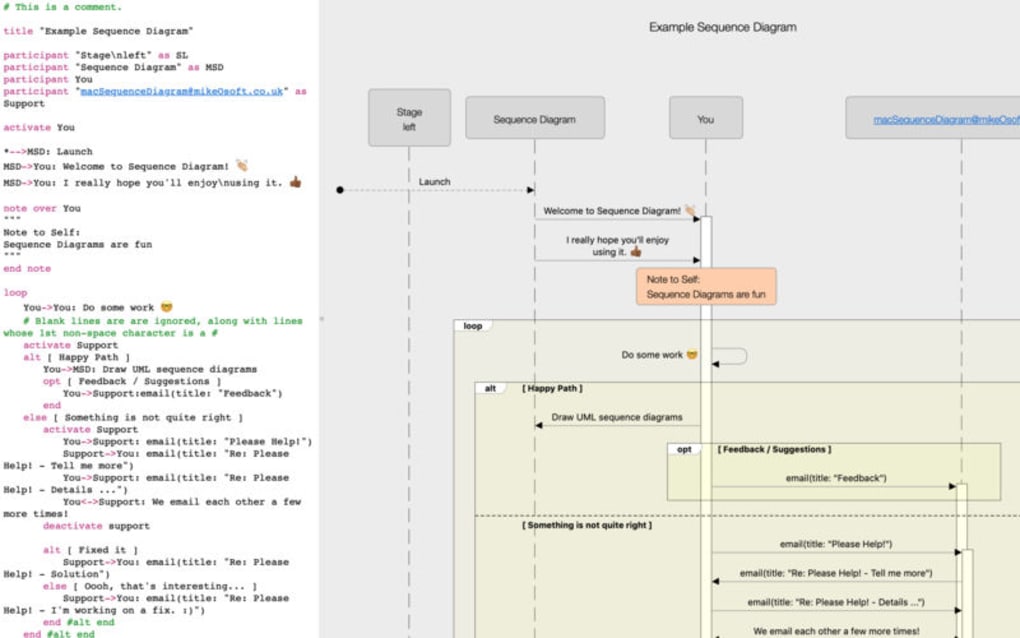
Users type a short, human‑readable script, and the app instantly renders a visual sequence diagram that can be exported as PNG, SVG, or PDF. Because the rendering engine follows the widely‑adopted UML syntax, the output is compatible with other modeling tools, making collaboration seamless. The application is free to download, runs on all major platforms—including Windows, macOS, Android, and iOS—and receives regular updates that address security patches and add minor enhancements without ever feeling bloated.
In short, Sequence Diagram offers a balanced mix of speed, clarity, and cross‑platform accessibility that makes it a standout choice for both casual users and seasoned professionals.
Key Features
- Plain‑text scripting: Write diagrams using an easy‑to‑learn, line‑based syntax that mirrors natural language.
- Instant rendering: See your diagram appear in real time as you type, eliminating the need for manual refreshes.
- Multi‑format export: Save diagrams as high‑resolution PNG, scalable SVG, or print‑ready PDF files.
- Cross‑platform support: Native applications for Windows, macOS, Android, and iOS ensure you can work wherever you are.
- Theme customization: Choose from light, dark, or custom color schemes to match your presentation style.
- Version control friendly: Because diagrams are stored as plain text, they integrate smoothly with Git, SVN, or other VCS tools.
- Collaboration links: Generate shareable URLs that let teammates view or edit diagrams without installing the app.
- Secure updates: Automatic, signed updates protect against tampering and keep the software current.
- Offline mode: Work without an internet connection; all features remain fully functional.
- Extensible library: Import custom shapes or symbols to represent domain‑specific objects.
These features are deliberately kept lean; each one serves a clear purpose without adding unnecessary complexity. The result is a tool that feels both powerful and approachable, allowing you to focus on the logic of your sequence rather than wrestling with a feature‑heavy interface. Users consistently praise the fast learning curve, especially those who have struggled with larger UML suites that demand steep training. Whether you need a quick sketch for a meeting or a polished diagram for documentation, Sequence Diagram provides the flexibility to meet those demands while staying free and secure.
Installation, Usage & Compatibility
How to Install
Installing Sequence Diagram is straightforward. For desktop platforms, visit the official website and click the appropriate installer: .exe for Windows or .dmg for macOS. The installer guides you through standard steps—accepting the license, choosing an installation folder, and creating a desktop shortcut.
Mobile users can find the app in the Google Play Store or Apple App Store by searching “Sequence Diagram”. All packages are signed and verified, ensuring a secure download. After installation, launch the app; the first‑time wizard offers a brief tutorial that demonstrates the basic scripting syntax and shows how to export your first diagram.
Using the Application
Once opened, you are presented with a clean editor pane on the left and a preview canvas on the right. Begin typing your diagram using the simple language: each line defines a participant and a message, for example, A->B: request. As you type, the canvas updates instantly, allowing you to iterate rapidly.
The toolbar provides quick actions such as “Save as Text”, “Export Image”, and “Toggle Theme”. For advanced users, a settings dialog lets you adjust line thickness, font size, and spacing to fine‑tune the visual output. The built‑in help panel can be accessed via F1, offering searchable examples and a cheat‑sheet of all supported commands.
Operating System Compatibility
Sequence Diagram runs on the following operating systems:
- Windows 10, 11 (64‑bit)
- macOS 11 (Big Sur) and later
- Android 8.0 (Oreo) and newer
- iOS 13 and newer (iPad and iPhone)
The application is built with a cross‑platform framework that ensures consistent performance across all environments. Minimum hardware requirements are modest: 2 GB RAM, 200 MB of free disk space, and a modern processor. Because the core engine is written in a platform‑agnostic language, updates are rolled out simultaneously for every OS, guaranteeing that all users benefit from the latest security patches and feature improvements at the same time.
Pros and Cons
Pros
- Free to download and use with no hidden fees.
- Fast, real‑time rendering eliminates waiting periods.
- Plain‑text format makes version control and collaboration effortless.
- Lightweight installer (under 30 MB) and low system requirements.
- Consistent experience across Windows, macOS, Android, and iOS.
- Regular, signed updates keep the software secure.
- Export options cover most common presentation needs.
Cons
- Lacks advanced UML features such as class diagrams or state charts.
- No built‑in diagram library for complex enterprise symbols.
- Customization of line styles is limited to a few presets.
- Collaboration links require an internet connection to view.
- While the syntax is simple, absolute beginners may need a short learning curve.
Frequently Asked Questions
Can I use Sequence Diagram offline?
Yes. All core features—including editing, rendering, and exporting—work without an internet connection. Offline mode is available immediately after installation.
Is the exported diagram editable in other tools?
Exported PNG and PDF files are image or document formats and cannot be edited directly. However, the original plain‑text script can be imported into any UML tool that supports the same syntax, allowing further modification.
How secure are the automatic updates?
Updates are digitally signed by the development team. The installer verifies the signature before applying the update, ensuring that only authentic, untampered code is installed on your device.
Can I integrate Sequence Diagram with Git?
Absolutely. Because diagrams are saved as plain‑text files, they can be added to any Git repository. This enables version tracking, branching, and collaborative review just like source code.
Is there a limit to the number of participants or messages?
There is no hard‑coded limit. Performance may gradually decrease with extremely large diagrams (hundreds of participants), but for typical use‑cases—such as documenting API calls or workflow steps—the app remains snappy.
Conclusion & Call to Action
Sequence Diagram delivers exactly what its name promises: a straightforward way to create professional sequence diagrams without the overhead of heavyweight modeling suites. Its free price tag, cross‑platform availability, and secure, real‑time rendering make it an attractive option for developers, educators, and anyone who communicates processes visually. While it intentionally omits more complex UML diagrams, that very focus keeps the tool lean, fast, and easy to master. If you regularly need to illustrate interactions—whether for software design, system documentation, or teaching—downloading Sequence Diagram will save you time and reduce friction.
Ready to streamline your diagramming workflow? Download Sequence Diagram now and start turning plain text into clear, shareable sequence diagrams today.
Overall Rating: 4.5 / 5
Pros: Free, fast rendering, cross‑platform, simple syntax.
Cons: Limited to sequence diagrams, minimal styling options.







